5 Best Free Passport Photo Maker Options for 2026
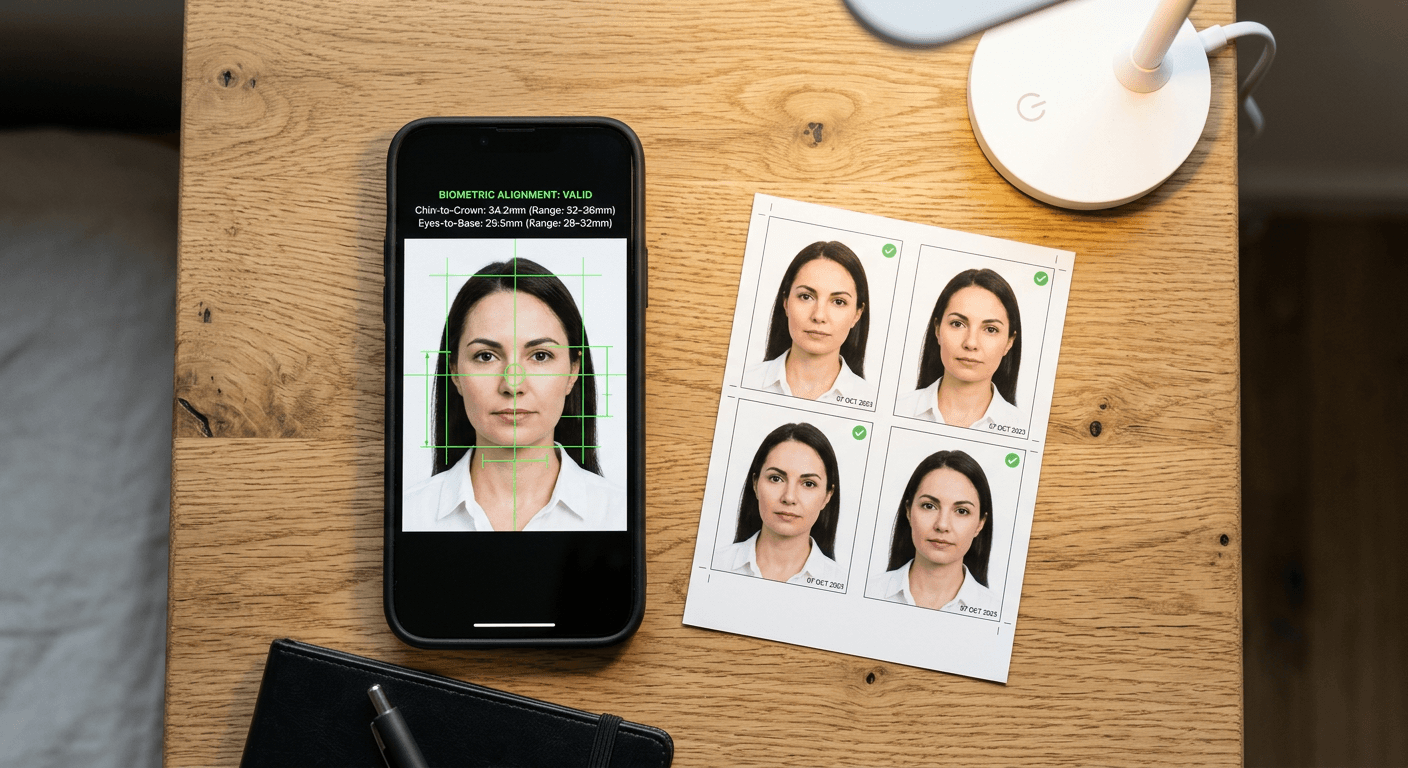
You are staring down at a squirming infant on a white bedsheet, holding a smartphone, and trying to capture a perfectly lit, neutrally expressive shot. After forty attempts, you finally get one that might work, but you now have to format it to strict government dimensions without paying twenty dollars at a pharmacy counter. Finding a reliable free passport photo maker changes that process from a studio booking into a quick digital task.
However, the gap between a standard image cropper and a biometric compliance tool is wide. A rejected photo delays travel, wastes application fees, and sends you back to the beginning. We examine the mechanics behind these utilities to identify which ones actually align your raw images with rigid national requirements.
Quick Summary
A free passport photo maker is a digital utility that resizes, crops, and formats standard images to meet government specifications for travel documents. The most effective tools automate biometric measurements, ensuring the distance from the chin to the crown of the head sits exactly within mandated tolerances before you print.
- Processing location matters: Client-side tools keep files on your device, while server-side tools handle heavier AI calculations.
- Automation varies: Some platforms rely entirely on manual user alignment, whereas others detect facial features automatically.
- Print formatting: A compliant digital crop must still be mapped to a standard photo paper size to print correctly at a kiosk.
- Database breadth: Tools supporting multiple countries must balance broad rules against highly specific local edge cases.
Table of Contents
- Buying Guide / How to Choose
- Comparison Table
- 1. IDPhoto4You
- 2. PassportPhotoSnap
- 3. PhotoGov
- 4. FreePassPhoto
- 5. PFPMaker
- Matching the Mechanism to the Requirement
- Recommended Reads
Buying Guide / How to Choose
To evaluate a passport photo maker, you must look past the interface and understand how it handles your biometric data. A basic image editor can crop a square, but official documents require precise ratios: the distance from the bottom of the chin to the top of the head must occupy a specific percentage of the total image height. If a tool fails to calculate that ratio, the resulting print will fail a consular check.
We classify these utilities based on their core processing method. This lens dictates what you have to do manually, where your data goes, and how strictly the tool enforces compliance. The three categories are:
- Manual Cropping: These tools provide a fixed overlay grid and require the user to scale and drag the photo until the facial features align with the guide markers. They run no active analysis on the image.
- Local Automated Processing: These run logic directly within your web browser. They execute face-detection scripts using your device's memory, ensuring the image file never travels to an external server.
- Cloud AI Processing: These platforms upload your file to a remote server where complex machine learning models detect the face, remove background noise, and calculate biometric ratios automatically.
Understanding these categories prevents you from using a manual overlay for a complex visa application or uploading sensitive images to a cloud server when offline execution would suffice. For instance, determining the precise head sizing in a New Zealand Baby Passport Photo Guide often demands either strict manual attention or robust AI detection, depending on which category you select.
Practical rule: Never evaluate a formatting tool using a perfectly lit stock image; test it using a photo taken under the actual lighting conditions in your home to see how its background separation functions.
Comparison Table
| Product | Processing Method | Features | Pros | Cons | Target Audience |
|---|---|---|---|---|---|
| IDPhoto4You | Manual Cropping | Multiple print sizes, 6-hour deletion | Supports large layouts, no hidden costs, clear privacy rule | No face detection, manual alignment only, requires strict user input | Detail-oriented applicants who know their dimension rules |
| PassportPhotoSnap | Local Automated Processing | Browser-based, no uploads | Excellent privacy, zero latency, offline capable | Device dependent, limited by browser, no complex background removal | Security-conscious applicants processing sensitive files |
| PhotoGov | Cloud AI Processing | AI formatting, auto-cropping | Hands-off formatting, fast processing, removes guesswork | Relies entirely on algorithm, upload required, no manual override | Users seeking rapid preparation of well-lit source photos |
| FreePassPhoto | Cloud AI Processing | 100+ country specifications | Broad database, AI alignment, multi-region support | Broad baseline rules, potential edge-case failures, server upload | Frequent travelers handling multiple international applications |
| PFPMaker | Cloud AI Processing | AI layout generation | Precise digital borders, quick export, standard DPI mapping | Struggles with bad lighting, no exposure fixing, strict source needs | Users who already have a technically sound source photograph |
1. IDPhoto4You
According to PhotoAiD's published review of the platform, IDPhoto4You is completely free to use with no hidden costs, subscriptions, or paywalls. That commercial reality dictates its technical structure: rather than paying for expensive cloud computing to run facial recognition algorithms, the platform shifts the labor to the user. We categorize this tool under Manual Cropping. When you import a file, the platform does not attempt to find the eyes or the chin. Instead, it provides a static overlay mask that matches the official proportions of the selected country.
All photo cropping is entirely manual as the tool does not use automated face detection, according to its technical summary on Photopass. You must drag, zoom, and rotate the image until the subject fits inside the guide lines. This mechanism places the burden of biometric compliance squarely on your shoulders. You have to know whether the ears need to be visible or exactly how much white space must sit above the crown of the head. We would hesitate to use this method for infants, as babies rarely sit perfectly straight, and manually adjusting a tilted posture without algorithmic help requires a highly steady hand. If you need to consult the United States Baby Passport Photo Guide just to figure out where the chin marker goes, a manual tool will slow you down.
Where the platform excels is in print preparation. The tool supports printable templates for standard paper sizes, including 9x13 cm, 10x15 cm, and 13x18 cm. This feature converts a single digital passport crop into a composite sheet that a standard pharmacy photo kiosk can print without altering the scale. Data management is equally straightforward: uploaded photos are automatically deleted from the server within 6 hours, ensuring temporary files do not linger indefinitely.
Mechanical simplicity leaves compliance in your hands
The platform relies entirely on your ability to interpret a visual guide, offering no warnings if your final crop places the head too low or leaves the background too dark.
Its honest limit is the complete absence of environmental correction; if your original photo has a slight shadow over one eye or an off-white background, this utility will only crop that flawed image to the correct size without fixing the underlying rejection triggers.
Choose this manual editor when you need to arrange multiple prints on a specific photo paper size and already possess a perfectly lit source file.
Pros
- Generates multi-photo composite sheets for standard photo paper sizes
- Enforces a strict six-hour server deletion policy for uploaded media
- Operates with complete transparency regarding its free commercial model
Cons
- Lacks automated facial recognition to assist with alignment
- Fails to warn users if the raw image contains uncorrectable shadows
- Requires tedious manual rotation for subjects who are not perfectly upright
2. PassportPhotoSnap
Unlike IDPhoto4You, which relies on a brief server upload to generate its templates, PassportPhotoSnap keeps the entire operation local to your hardware. This utility functions as a free browser-based tool for creating passport and ID photos locally on your device. We place this in the Local Automated Processing category. When you navigate to the site, the web page loads HTML5 and JavaScript components that execute directly inside your browser's memory.
The mechanism here is client-side processing. You select a photo from your camera roll or hard drive, and the script analyzes the image data without initiating a network transfer to a remote database. This architectural choice fundamentally eliminates the risk of interception during transit, bypassing the standard Privacy Policy concerns associated with sending biometric data to unknown third-party servers. We would actively deploy this approach when working on a restricted corporate network or when handling images of vulnerable family members where data sovereignty is the primary concern.
However, processing locally means the tool is constrained by the compute power of your actual device. A modern smartphone will handle the face detection script in milliseconds, but an older tablet with limited RAM might crash the browser tab when trying to parse a high-resolution, 12-megapixel raw file. Furthermore, because it cannot leverage massive cloud GPUs, the local scripts generally struggle with complex edge detection. If the subject has wispy hair blending into a similarly colored wall, the local script will likely fail to isolate the head cleanly.
Client-side execution prioritizes data privacy
Executing the alignment math on the user's hardware guarantees that the image never leaves the room, trading advanced background replacement for absolute operational security.
Because the local script lacks the processing power for heavy computational tasks like synthetic background generation, it cannot realistically paint a compliant background behind the subject. Your wall must already be bright white and evenly lit before you take the picture.
Opt for this secure utility when formatting sensitive documents on a modern device in an environment that already meets official lighting requirements.
Pros
- Prevents biometric data from ever leaving the user's local hardware
- Functions entirely without a persistent internet connection once loaded
- Executes sizing adjustments with zero network latency
Cons
- Struggles to process very high-resolution source files on older devices
- Lacks the computing power required for accurate background replacement
- Provides less accurate edge detection around complex hair textures
3. PhotoGov
The hardest part of document preparation is translating a dense government manual into a correctly framed digital file. PhotoGov targets this exact bottleneck by taking the decision-making process away from the user. It operates as an online tool that uses artificial intelligence to automatically process and format images into official document photos. This places it firmly in the Cloud AI Processing category.
When you submit an image, the platform transmits the file to a central server. Computer vision algorithms map the biometric markers. The mechanism identifies the pupils. It also finds the tip of the nose and the base of the chin. Once those coordinates are established, the AI cross-references them against the requested country's specifications. If you request a format based on the Germany Baby Passport Photo Guide, the system calculates the required 35 by 45-millimeter dimensions. It automatically scales the head to occupy the mandated 70 to 80 percent of the vertical frame.
We would hold off on relying exclusively on this automated flow if the source photo has dramatic contrast or side-lighting. While the AI is highly proficient at calculating geometry, it cannot invent pixel data hidden by deep shadows. If half the face is dark, the biometric mapping will fail to find the exact edge of the jawline, resulting in a misaligned crop. The system excels at speed, returning a formatted file in seconds, provided the input data is clean.
Automated processing reduces manual ratio calculations
By offloading the geometric math to a server, the platform prevents the common user error of submitting a head size that is two millimeters too large for the specific document type.
This platform does not provide any manual override. If the algorithm misidentifies a heavy shadow under the chin as the bottom of the jaw, you cannot drag the crop box to correct the AI's mistake.
Rely on this cloud application when you possess a flat, evenly lit photograph and need immediate, hands-off biometric formatting.
Pros
- Calculates complex head-to-image ratios without user intervention
- Processes and returns the formatted file almost instantaneously
- Removes the need to memorize specific national dimension requirements
Cons
- Fails to provide manual adjustment tools if the AI miscalculates
- Requires an active internet connection to transmit the large source file
- Struggles to locate facial markers accurately in uneven lighting
4. FreePassPhoto
Can one utility handle a European visa, an American green card application, and a Canadian citizenship renewal simultaneously? FreePassPhoto attempts this by functioning as a free online passport photo generator that uses AI to crop photos to official specifications for over 100 countries. We classify this widespread approach as Cloud AI Processing, as maintaining and applying a database of that size requires server-side architecture.
The core mechanism relies on a vast lookup table of international standards paired with a central cropping algorithm. When a user selects a destination country, the server pulls the exact millimeter dimensions and head-size percentages required by that jurisdiction. It executes a biometric crop on the uploaded file. This broad database is highly effective for serial expatriates or frequent travelers. They often pivot from a 2-inch square US requirement to a 35 by 45-millimeter United Kingdom Baby Passport Photo Guide standard. They do this without switching applications.
However, maintaining rules for over 100 countries creates a specific vulnerability: the system relies on broad baseline rules. We would hesitate to use this tool for highly strict edge cases, such as newborn applications in countries with zero tolerance for tilted postures. When an algorithm is tuned to handle a hundred different scenarios adequately, it occasionally misses the nuanced severity of a single nation's shadow rejection policy.
Practical rule: Always check your printer's scaling settings before outputting a 4x6 template generated online; default "fit to page" margins will shrink a 2-inch head size out of compliance, instantly ruining a perfectly cropped digital file.
Broad database coverage trades depth for international reach
Serving over a hundred jurisdictions means the platform prioritizes standard adult formatting, occasionally overlooking the stringent exemptions and unique rejection triggers of specific consulates.
Users must account for latency in database updates. When a specific government alters its background color requirement from pure white to light gray, a massive centralized database often takes weeks to reflect that single, critical change.
Use this generator when managing standard adult applications across multiple, varying international jurisdictions from a single dashboard.
Pros
- Supports specific dimensions for over a hundred different national documents
- Switches between disparate sizing requirements using a single interface
- Applies AI alignment to speed up multi-country application processes
Cons
- Tends to overlook highly specific, localized edge-case rules
- Requires users to trust that the central database is perfectly up to date
- Relies entirely on cloud uploads, exposing the file to network delays
5. PFPMaker
A common mistake when searching for a passport photo online free is assuming that a tool designed for social media profile pictures understands biometric rigidity. PFPMaker bridges this gap by acting as an AI-powered online photo tool that crops and formats images strictly to passport size specifications. Falling under the Cloud AI Processing category, it leverages algorithms similar to its profile-picture suite but constrains the output to official document standards.
The mechanism focuses heavily on the final digital export. After the server maps the face and executes the crop, it maps the resulting image to a strict DPI (dots per inch) count. A passport photo checker online free often flags images that have the correct millimeter dimensions but lack the pixel density required for clear printing. By ensuring the output maintains high resolution, this platform ensures the digital file will not artifact or blur when uploaded to a government portal or sent to a commercial printer.
We would caution against expecting the tool to perform miracles on bad photography. It is fundamentally an image cropper and formatter. It cannot fix a blurry source file, nor will it correct the color temperature if you took the photo under a yellow tungsten lightbulb. The AI is designed to frame the subject, not to act as a comprehensive photo retouching suite.
Formatting consistency depends on the source image quality
The platform reliably outputs files with the correct digital density, but it strictly requires a sharp, well-exposed original photograph to achieve a compliant result.
This utility's operational limit is its inability to correct exposure; if you upload an image where the subject's skin tone is altered by bad indoor lighting, the final cropped file will simply be a perfectly sized photo that fails the government's color-accuracy check.
Select this utility when your source photo is technically flawless and you require precise digital borders and correct DPI mapping for an online application.
Pros
- Ensures the final digital export meets strict DPI printing standards
- Leverages robust AI mapping to frame the subject rapidly
- Generates a clean file optimized for digital government portals
Cons
- Cannot correct severe color casts caused by poor indoor lighting
- Fails to sharpen original images that suffer from motion blur
- Provides no manual retouching tools to fix minor background blemishes
Matching the Mechanism to the Requirement
Choosing the right free passport photo maker depends entirely on your technical comfort, your privacy requirements, and the quality of your raw image. Categorizing the tools by their processing methodology clarifies which one will solve your specific formatting bottleneck without creating a new rejection risk.
If you prefer to maintain total control over your biometric data, the Local Automated Processing method is your best route. Tools in this category execute entirely on your hardware. This approach is highly effective for security-conscious users, but it demands that you have a modern device capable of running complex scripts in the browser. You must also supply an image with a naturally perfect background, as local scripts lack the power to synthesize a compliant white backdrop.
When you understand the exact measurements required for your application and want to prepare a multi-image layout for physical printing, Manual Cropping serves that need perfectly. This category strips away the AI, forcing you to align the chin and crown manually. It requires patience and a steady hand, but it guarantees that the final placement is exactly what you decided it should be, making it ideal for detail-oriented users who trust their own visual judgment over an algorithm.
For most users, Cloud AI Processing offers the clearest path to rapid compliance. By offloading the biometric mapping to external servers, these platforms eliminate the guesswork of head-to-image ratios. They are particularly useful when you need to switch rapidly between different country specifications or lack the time to manually measure pixels. However, utilizing these cloud platforms often means waiving the safety of a 100% Refund Policy on your application fees if the algorithm makes a mistake, so you must always review the final crop carefully before submission.