A Complete Guide to Global Passport Photo Size Standards
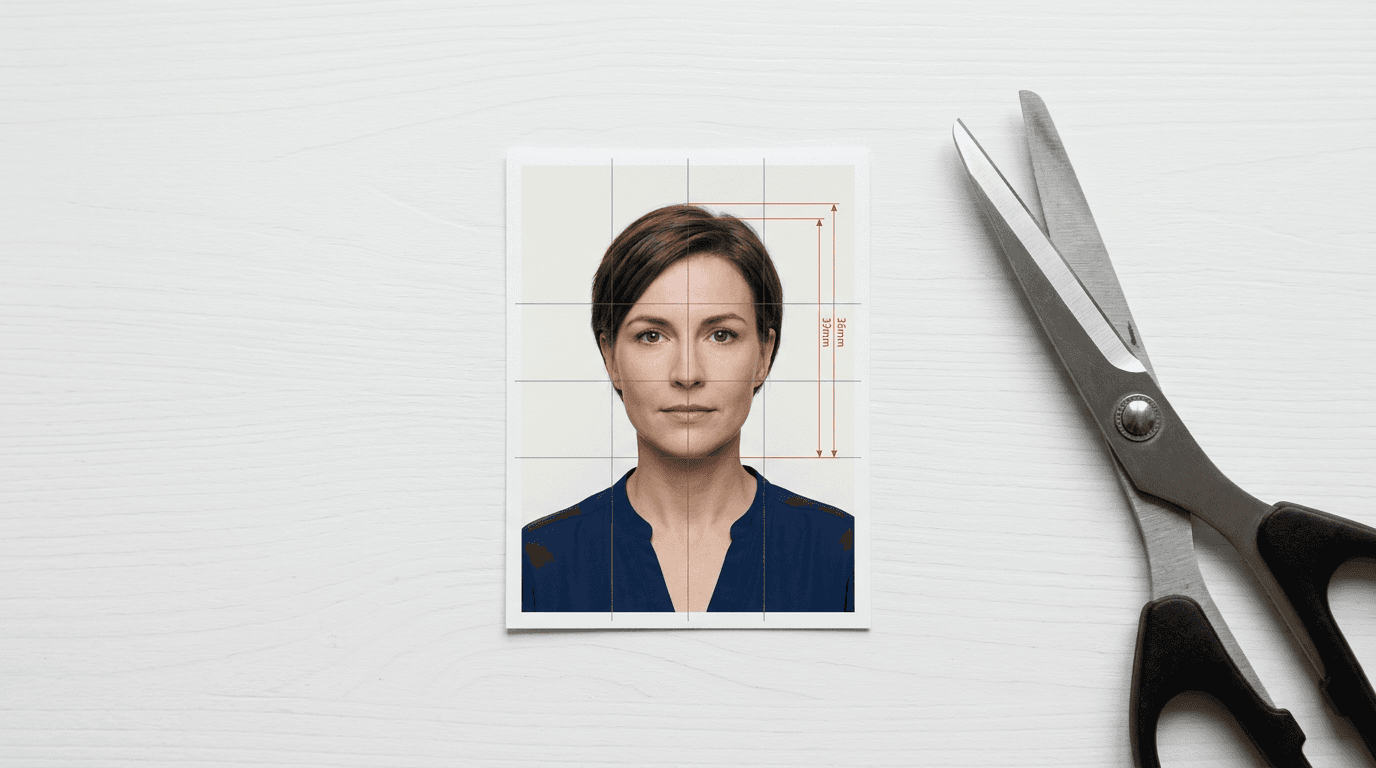
A frequent misconception in travel documentation is that cutting a printed image to exactly the required dimensions guarantees compliance. In reality, the physical outer dimension is merely the final container for a strict mathematical map of the human face. Automated border control systems do not evaluate the paper; they evaluate the biometric geometry printed on it. If your face occupies a smaller proportion of the frame than the standard mandates, the application will be rejected, regardless of how perfectly you trimmed the edges. Understanding the mechanics of a passport photo size requires looking past the physical paper and analyzing the biometric grid that governments use to verify identity.
Quick Summary
The passport photo size is a two-part standard consisting of a mandatory outer physical dimension and a strict internal biometric frame. While the United States requires a 2x2 inch photo, most of the world uses a 35x45 mm standard. Both formats demand exact chin-to-crown ratios and specific eyeline placement to pass automated facial recognition software.
- Outer dimensions vary: The US mandates 2x2 inches (51x51 mm), whereas Europe and the UK require 35x45 mm.
- Biometric framing controls rejection: The face must occupy a specific percentage of the total image area, usually defined by a precise chin-to-crown measurement.
- Infant requirements are distinct: While physical sizes remain identical for babies, acceptable posture and eye-contact standards differ significantly.
- Digital compliance relies on resolution: Uploaded images require specific pixel dimensions (e.g., 600x600 pixels) and a minimum of 300 DPI for physical printing.
Table of Contents
- The Anatomy of a Passport Photo Size
- Standard Dimensions Across Major Regions
- The Biometric Framing Constraint
- Why Infant Applications Fail
- Digital vs. Printed Resolution
- Verifying Hardware and Lighting Mechanics
- FAQ
- Recommended Reads
The Anatomy of a Passport Photo Size
The foundational architecture of any identity document image is governed by the International Civil Aviation Organization (ICAO), specifically Document 9303. This standard establishes the baseline requirements for Machine Readable Travel Documents (MRTDs). When a government sets its passport photo size, it is translating these international guidelines into its domestic printing standards.

The size constraint operates on two separate axes. The first is the absolute physical dimension of the printed paper or the pixel count of the digital file. The second is the internal proportion: how the subject's head sits within that available space. You can think of the outer boundary as the canvas and the internal proportion as the mandatory scale of the subject. A photo that is the correct size on the outside but zoomed in too far on the inside will fail inspection immediately.
For applicants in the United States, the physical constraint is rigid. The image must measure exactly 2 inches by 2 inches. This square format requires careful attention to the United States infant photo requirements, as the square aspect ratio forces a different horizontal framing than the rectangular formats used elsewhere in the world. The image must be printed on high-quality photographic paper, either matte or glossy, without any digital artifacting or compression blurring.
Standard Dimensions Across Major Regions
Global travel requires navigating a fractured landscape of measurement standards. While the underlying ICAO biometric rules remain consistent, the physical dimensions governments ask for depend largely on their domestic metric or imperial systems.
The most prominent divide is between the US 2x2 inch standard and the European 35x45 mm standard. Submitting a 35x45 mm photo for a US application, or a 2x2 inch photo for a Schengen visa, results in automatic rejection because the physical document templates used by the respective passport agencies cannot accommodate the alternative shapes.
| Country / Region | Physical Size (Metric) | Physical Size (Imperial) | Digital Pixel Requirement (Typical) |
|---|---|---|---|
| United States | 51 x 51 mm | 2 x 2 inches | 600 x 600 pixels minimum |
| European Union | 35 x 45 mm | 1.38 x 1.77 inches | 413 x 531 pixels (at 300 DPI) |
| United Kingdom | 35 x 45 mm | 1.38 x 1.77 inches | Minimum 750 pixels high |
| Canada (Passport) | 50 x 70 mm | 2 x 2.75 inches | 420 x 540 pixels minimum |
| Saudi Arabia | 51 x 51 mm | 2 x 2 inches | 600 x 600 pixels minimum |
| Australia | 35 x 45 mm | 1.38 x 1.77 inches | N/A (Digital requires specific portal) |
When applying for international documentation, such as following the United Kingdom infant photo guidelines, you must strictly adhere to the destination country's format, not your country of origin. A US citizen applying for a UK visa must supply a 35x45 mm image, abandoning their native 2x2 inch standard entirely.
The Biometric Framing Constraint
The outer dimensions of the image are trivial compared to the internal passport photo specifications. The hidden engine of compliance is biometric framing. Facial recognition algorithms rely on stable, predictable reference points to map the geometry of a human face. The most critical reference points are the pupils of the eyes, the tip of the nose, the bottom of the chin, and the top of the head (the crown, excluding hair).
If the face is too small within the frame, the pixel density of the facial features drops, meaning the algorithm cannot accurately measure the distance between the eyes. If the face is too large, the image fails to provide the necessary background contrast around the head, which software uses to isolate the silhouette.
To standardize this, agencies mandate strict chin-to-crown measurements. In the US 2x2 inch format, the head must measure between 1 inch and 1.375 inches (25 to 35 mm) from the bottom of the chin to the top of the head. Furthermore, the eyes must be positioned vertically between 1.125 inches and 1.375 inches (28 to 35 mm) from the bottom edge of the photo.
Practical rule: Never crop a passport photo by looking at the shoulders. Always measure the height of the face first, place the head inside the required millimeter bounds, and let the shoulders fall wherever the aspect ratio dictates.
These passport photo specs apply across all age groups. Understanding the mechanics of biometric scanning explains why agencies are so unforgiving regarding head tilt. A head tilted back alters the two-dimensional distance between the chin and the eyes, distorting the biometric map. You can review the foundational mechanics of how these standards are enforced by examining a comprehensive global passport requirement overview, which details how internal framing dictates software validation.
Why Infant Applications Fail
Adult applications usually fail due to incorrect sizing or expired photos. Infant applications fail because the physical mechanics of photographing a baby conflict directly with strict biometric standards. A newborn cannot sit unassisted, hold their head straight, or reliably look at a camera lens. When parents attempt to force a compliant photo, they encounter four distinct failure modes that appear identical from the outside (a rejection for "poor composition") but require entirely different fixes.

Problem 1: The Compressed Chin-to-Crown
When photographing an infant lying on their back, parents often stand directly over the child and shoot downward. If the phone camera is not perfectly parallel to the floor, the lens captures the baby from a slight angle. This perspective distortion artificially shortens the face in the resulting two-dimensional image. When the automated system attempts to measure the chin-to-crown ratio, the head appears compressed, failing the required millimeter bounds.
The check: Look at the infant's ears in the photograph. If you can see more of the top of the head than the underside of the chin, your camera was tilted. The lens must be perfectly parallel to the child's face.
Problem 2: The Floating Shoulder
Because infants have very little neck control, their heads often sink into their shoulders when placed on their backs. When the parent crops the image to achieve the correct passport photo size requirements, the lack of visible neck makes the head appear oversized. The software cannot determine where the chin ends and the chest begins, leading to a biometric rejection.
The check: Roll a small towel and place it beneath the sheet under the baby's neck. This forces the chin up slightly, creating the necessary shadow demarcation between the jawline and the collarbone.
Problem 3: Shadow Masking
Infants are frequently photographed on a white bedsheet to satisfy the background requirement. However, ambient room lighting casts a distinct drop-shadow from the baby's head onto the sheet. Facial recognition software requires a clear silhouette against a uniform background. Heavy drop shadows trick the algorithm into reading the shadow as part of the subject's hair, expanding the perceived width of the head and ruining the biometric ratio.
The check: Examine the perimeter of the infant's head. If there is a dark halo on one side, you have a shadow failure. This is why many parents turn to services with automated background removal, relying on a strict compliance refund policy if the software's isolation algorithms fail to satisfy the agency.
Problem 4: Hands and External Objects
Parents naturally try to soothe an infant by holding their hands or using a pacifier just before the photo is taken. Sometimes, a parent's fingers are visible supporting the infant's head. Government standards explicitly forbid any external object, including parental hands, from appearing in the frame.
The check: Inspect the bottom corners of the uncropped image. If any skin tone other than the baby's is visible, the image will be rejected. Ensuring full compliance often means reviewing specific regional documentation, such as the Australian infant passport image rules, which detail exact tolerances for infant posture.
Digital vs. Printed Resolution
The transition from physical processing to digital uploads has introduced a new layer of complexity: the passport photo ratio. When you print a photo, the physical dimensions (e.g., 2x2 inches) govern the output. When you upload a digital photo, the aspect ratio and pixel dimensions take over.
An aspect ratio is the proportional relationship between the width and the height of the image. The US 2x2 inch photo has a 1:1 aspect ratio; it is a perfect square. The EU 35x45 mm photo has an aspect ratio of 7:9. You cannot compress a 7:9 image into a 1:1 square without either stretching the face (which ruins the biometrics) or cropping out part of the image (which ruins the head framing).
Digital applications also enforce strict resolution minimums. The US State Department requires digital uploads to be at least 600 by 600 pixels. A standard smartphone captures images well above this threshold (often 3000x4000 pixels or higher). The error occurs during the cropping phase. If you use a basic photo editor on your phone to zoom in heavily on a small face in a wide photo, you are discarding millions of pixels. The resulting cropped image may have the correct aspect ratio but lack the necessary pixel density.
For printed photos, the critical metric is DPI (Dots Per Inch). A photo must be printed at a minimum of 300 DPI to avoid pixelation. If you map a 600x600 pixel image onto a 2x2 inch canvas, you achieve exactly 300 DPI (600 pixels divided by 2 inches). Printing a low-resolution image stretches the available pixels across the paper, resulting in blurred edges around the eyes and nose. This blur prevents the scanner from finding the pupil centers. For nations with unique sizing constraints, such as the Canadian physical document format (which requires a 50x70 mm print), managing the exact conversion from digital pixels to physical millimeters is the most frequent point of failure.
Verifying Hardware and Lighting Mechanics
Achieving the correct photo size for passport submissions requires controlling the mechanical environment before the shutter is pressed. Relying on software to fix a badly lit, poorly positioned photograph introduces digital artifacts that border agencies penalize.
Lighting is the most critical mechanical variable. Facial recognition software requires flat, even illumination across the face. Directional lighting, such as a single window on the left side of the room, creates a gradient of light across the face. One cheek will be heavily shadowed while the other is properly exposed. This contrast disparity alters the perceived symmetry of the face.
The optimal lighting setup utilizes flat, diffused, frontal illumination. Standing directly facing a large, indirect light source (like a window on an overcast day) ensures both sides of the face receive equal photons.
Practical rule: To eliminate facial shadows, ensure the light source is directly in front of the subject's face, not above it. Overhead lighting casts deep shadows under the eyebrows and chin, obscuring the precise biometric landmarks the software needs to map.
When preparing the file for a physical print at a local pharmacy or print center, the most common error is relying on printer defaults. Standard consumer photo printers default to "Fit to Page" or "Borderless Printing" settings. These settings automatically scale the image to fill the 4x6 inch photographic paper. If your file contains a perfect 2x2 inch image, the "Fit to Page" setting will magnify it, increasing the physical size by a few millimeters and causing an immediate rejection.
To print successfully, you must generate a 4x6 inch digital canvas (at 300 DPI, meaning a 1200x1800 pixel file) and place the correctly sized passport photos precisely onto that canvas. The printer must be set to print at 100% scale without any borderless expansion. This guarantees that the millimeters defined in the digital file translate exactly to the physical ink on the paper.
FAQ
Can I crop a regular photo to meet passport requirements? Yes, provided the original image meets all biometric, lighting, and background requirements. However, simply cutting a photo to a 2x2 inch size does not guarantee compliance; the subject's head must still fall within the exact chin-to-crown millimeter specifications required by the agency.
Why was my photo rejected if it was exactly 2x2 inches? A photo is often rejected for improper internal framing, not outer dimensions. If your head is too large or too small within that 2x2 square, or if your eyes are vertically misaligned, the biometric software cannot process the image and the application will fail.
Does a baby's passport photo need to be the same size as an adult's? Yes. The physical dimensions of the printed photo (e.g., 2x2 inches in the US, 35x45 mm in the UK) remain identical regardless of the applicant's age. The internal head sizing requirements also apply strictly to infants.
How do I ensure my digital passport photo has the correct resolution? Do not over-zoom when taking the picture. Capture the subject from a moderate distance so the camera's full sensor is utilized. When you crop the image to the correct aspect ratio, ensure the final file contains at least the minimum required pixels (e.g., 600x600 pixels for US digital uploads).
What is the difference between aspect ratio and physical size? Physical size defines the actual inches or millimeters on a printed piece of paper (like 2x2 inches). Aspect ratio defines the digital shape of the image (like a 1:1 square). An image must have the correct aspect ratio digitally to print at the correct physical size without distortion.