How Strict UK Passport Photo Requirements Trigger Digital Rejections
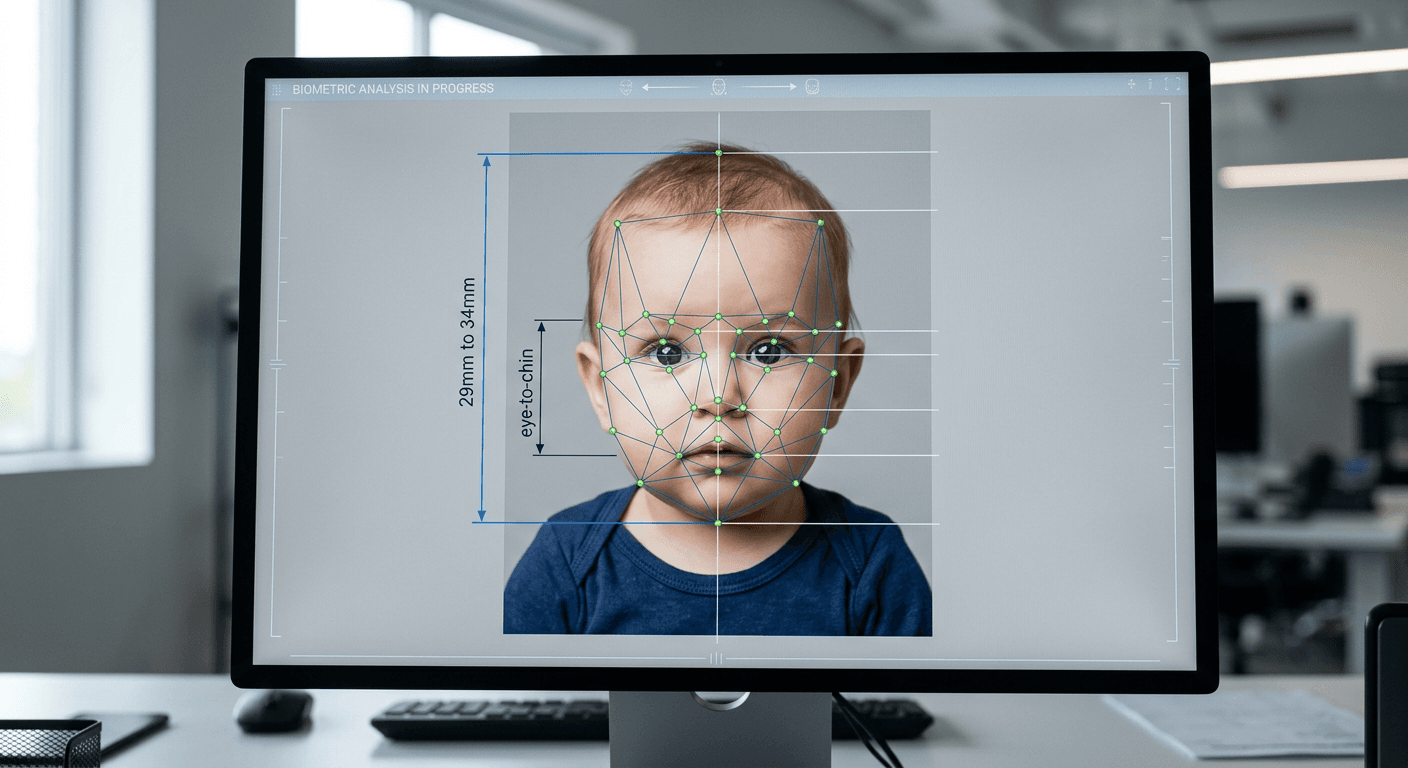
A parent uploads a carefully staged, brightly lit digital image of their child to the HM Passport Office portal, only to watch the progress bar freeze and return an immediate rejection error. The upload failed because a standard smartphone image processor automatically applied a slight depth-of-field blur to the background, altering the edge pixels around the child's hair. Navigating uk passport photo requirements is not about capturing a flattering likeness or a pleasant portrait. It is an exercise in strict data formatting, where the camera acts as a scanner collecting geometric data points for an automated border control system.
Quick Summary
The British passport office treats an applicant's photograph as a strict biometric dataset rather than a traditional portrait. Meeting the standard requires absolute control over dimensional scaling, background contrast, and facial geometry.
- HMPO mandates a plain light gray or cream background; stark white causes exposure issues and triggers rejection.
- The subject's head must measure exactly 29 to 34 millimeters from the crown to the chin.
- Digital submissions require uncompressed files strictly without standard software filters or aesthetic edits.
- Infant applications feature specific exemptions regarding eye line, but maintain strict physical background constraints.
Table of Contents
- Biometric scanners map facial geometry instead of appearance
- Incorrect digital scaling breaks the physical dimension rules
- Background shadows trigger immediate software rejection
- Infant applications require different mechanical setups
- Generic background removal tools fail the digital border check
- What to measure before paying for the application
- FAQ
- Recommended Reads
Biometric scanners map facial geometry instead of appearance
HM Passport Office does not look at a photograph to see if it resembles the applicant. The ingestion software converts the two-dimensional image into a mathematical grid, measuring the exact distances between specific nodal points - the width between the pupils, the distance from the bottom of the nose to the upper lip, and the angle of the jawline.
When a subject smiles, the facial mechanics break this baseline mapping. The cheeks lift, the eyes narrow, and the chin shifts upward. A biometric border gate will compare the live scan of the traveler's neutral face against the smiling photograph embedded in the passport chip, calculate a mathematical mismatch, and lock the gate. Similarly, eyeglasses introduce two distinct failure modes: heavy frames physically obscure the orbital bone, while lenses inevitably catch glare from the flash, masking the iris data completely.
To prevent a rejection based on geometry, applicants should check the horizontal alignment before finalizing the image. Draw an imaginary line across the pupils; it must be perfectly parallel to the top edge of the photograph. If the head is tilted even a few degrees to the left or right, the vertical symmetry required by the mapping software is destroyed.
Incorrect digital scaling breaks the physical dimension rules
When assessing the correct uk passport photo size, the dimensions operate on two distinct axes: the outer boundary of the file and the internal proportion of the face. For physical prints, the standard dictates a bounding box of 45 millimeters high by 35 millimeters wide. Inside that box, the distance from the crown of the head to the bottom of the chin must sit strictly between 29 and 34 millimeters.
If the head is too large, it crowds the frame, depriving the automated software of the edge context it needs to separate the jawline from the background. If the head is too small, there is insufficient pixel density across the eyes to map the facial features accurately. For an online uk passport photo, these physical measurements translate to a digital canvas of at least 600 pixels wide by 750 pixels high, with a file size contained between 50KB and 10MB.
Digital files printed at a retail pharmacy for mail-in applications must output at a minimum of 300 DPI (dots per inch). Submitting a file with a lower resolution causes the printer to stretch the available data, resulting in micro-pixelation along the edges of the face that HMPO software interprets as digital tampering.
Practical rule: Never crop a digital file precisely to the top of the head before uploading. The HMPO portal applies its own digital cropping overlay during the upload sequence, and starting with an image cropped too tightly removes the essential visual buffer the software requires to center the face.
Background shadows trigger immediate software rejection
One of the most frequent reasons an application fails is the assumption that a white background is universally compliant. The UK strictly prohibits stark white backgrounds, requiring plain light gray or cream instead. A bright white background causes exposure bloom on digital camera sensors, washing out the edges of pale skin or blond hair and destroying the sharp silhouette the software needs to map the head.
Lighting angles present an equally rigid constraint. Standard overhead room lighting casts a "butterfly" shadow beneath the nose and dark pools in the eye sockets. The scanning algorithm interprets heavy shadows as physical voids in the facial structure. If one side of the neck has a darker shadow than the other, the software assumes the face is turned away from the lens, triggering a rejection for improper posture.
To verify the lighting is compliant before submission, examine the hollows of the subject's neck and the sides of their nose on a high-brightness monitor. If a shadow is visible, the lighting was directional rather than ambient. The subject must face a natural light source directly, ensuring the illumination falls flat across the entire face and washes out any shadows cast on the gray wall behind them.
Infant applications require different mechanical setups
While adult regulations focus on rigid posture, british passport photo requirements offer specific, mechanical exemptions for infants because newborns lack the muscle control to sit upright and stare at a lens. Children under the age of one are not required to have their eyes open, and children under six are exempt from the strict neutral expression and direct-gaze rules.
However, the physical background constraints remain absolute. The inclusion of visible supporting hands, pacifiers, or toys will result in immediate rejection. Parents frequently attempt to hold the infant up against a wall, inevitably capturing their own fingers in the frame. The compliant mechanical solution is to lay the infant flat on their back on a plain light gray blanket. The photographer must then shoot from directly above, keeping the camera lens perfectly parallel to the floor to prevent chin foreshortening.
For parents navigating these specific exemptions, understanding the rules outlined in a dedicated United Kingdom Baby Passport Photo Guide clarifies the exact boundary between what the automated system tolerates and what it rejects. Relying on adult guidelines for a newborn guarantees a failed application, as does assuming the infant exemptions permit cluttered backgrounds.
Generic background removal tools fail the digital border check
The central problem with processing united kingdom passport photos through consumer software is how modern smartphones handle depth. Apple and Android native cameras apply automatic noise reduction and skin smoothing, which destroys the micro-contrast in the skin that border scanners rely on for verification.
When applicants use generic "magic eraser" tools to replace a cluttered living room wall with a gray background, the software inevitably leaves pixel fringing - a jagged, unnatural edge along the hairline where the original background color was imperfectly deleted. The HMPO anti-fraud algorithms are specifically tuned to detect these masking errors, flagging the submission as a manipulated composite image.
Compliant biometric processors, like specialized AI platforms that guarantee compliance via a 100% refund policy, do not merely erase pixels. They map the subject, separate the foreground, replace the background with the exact approved hex code for light gray or cream, and reconstruct the alpha channel at the hairline. This ensures the digital file maintains its metadata integrity and passes the automated forensic checks.
What to measure before paying for the application
Before paying the processing fee, applicants must independently verify the raw data within the image. An image that looks acceptable on a small smartphone screen will often fail when subjected to HMPO's desktop-level biometric scan.
First, check the color cast. A light gray wall photographed in a room with warm incandescent bulbs will appear yellow, while cloudy window light can cast a blue tint. The background must register as a neutral gray or cream without heavy color contamination.
Second, perform a resolution check. Zoom the image to 100% on a desktop monitor and examine the subject's pupils. If the edges of the iris are blocky or blurred, the image compression is too high and the file lacks the necessary pixel density.
Practical rule: Turn off the smartphone's portrait mode entirely before taking the photograph. Artificial depth-of-field blurring destroys the sharp focal plane required across the ears, hair, and neck, rendering the file useless for biometric extraction.
By systematically verifying the geometric alignment, scaling proportions, and pixel integrity, applicants can bypass the common digital failure modes and ensure their submission clears the automated border software on the first attempt.
FAQ
Can I wear makeup in a biometric passport photo?
Yes, provided the makeup does not alter your fundamental facial geometry. Heavy contouring designed to narrow the appearance of the nose or alter the jawline can cause a biometric mismatch at automated border gates, leading to delays during travel.
Why did the online checker accept my photo, but the manual review rejected it?
The initial online upload portal performs a basic geometric scan to ensure a face is present, the file size is correct, and the lighting is roughly even. Human examiners subsequently check for subtle violations that the automated system frequently misses, such as red-eye reduction edits, heavy compression artifacts, or improper background textures.
Can I wear glasses if I need them for medical reasons?
HMPO strongly advises removing all glasses to prevent automated rejection. If severe medical reasons require them to remain on, the frames must not cover any part of the eye, and there must be absolutely no glare on the lenses. Standard anti-reflective coatings still produce a slight green or purple hue under flash lighting, which will result in rejection.
Do my ears need to be completely visible in the photograph?
Your ears do not need to be entirely exposed, but your hair cannot fall across your eyes or obscure the outer edges of your face. The scanner must be able to map the exact width of your cheekbones and the unbroken curve of your jawline.