How to Format Photos for Schengen Visa Applications
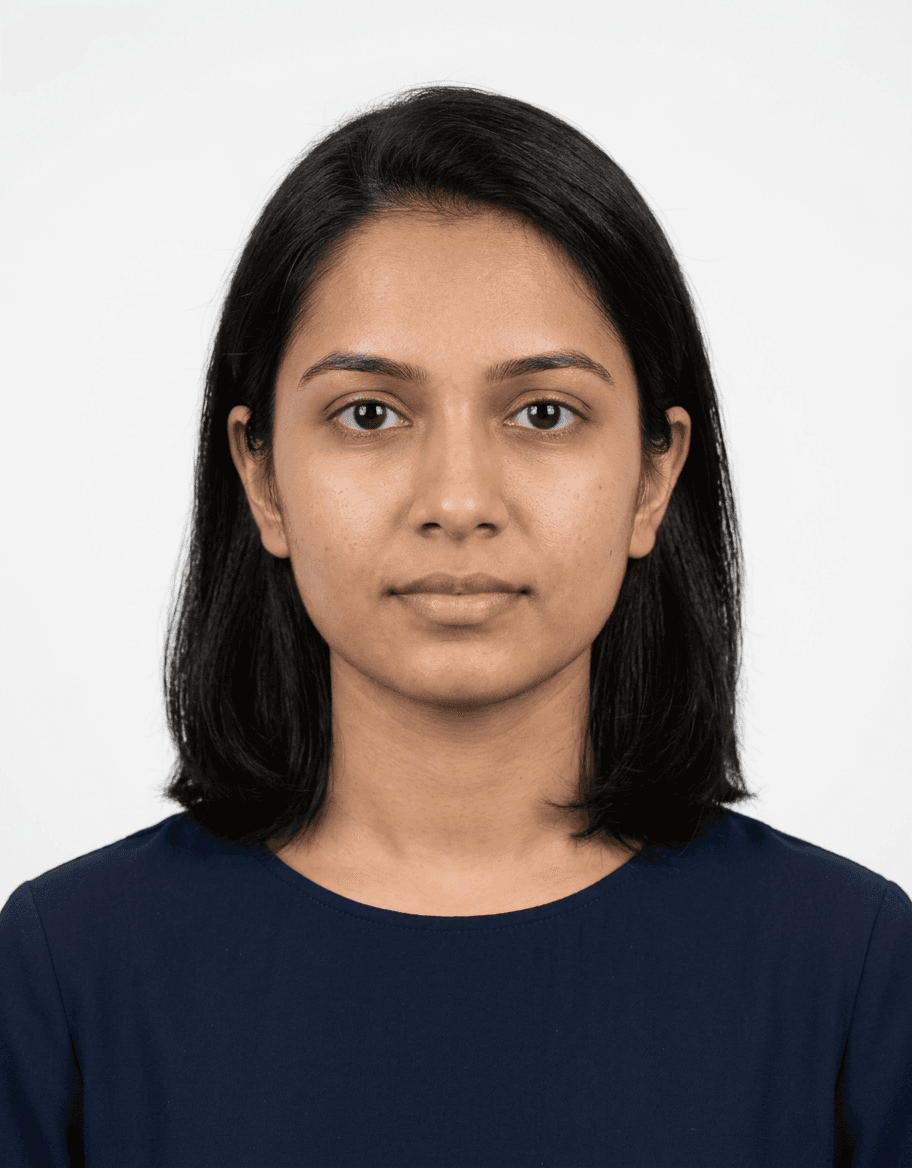
Obtaining a passport size photo for Schengen visa applications requires strict adherence to international standards to ensure your travel documents are processed without delay. Consular authorities are rigorous regarding image quality, composition, and dimensions, as these photos serve as the primary biometric identifier for your visa identity verification. Understanding the exact Schengen visa passport photo requirements is the first step in avoiding the common frustration of rejected applications due to non-compliant portrait submissions.
Quick Summary
A passport size photo for a Schengen visa must measure 35mm x 45mm, feature a plain light-colored background, and show a clear, neutral facial expression. The applicant must be facing forward with eyes open and visible, ensuring no shadows or obstructions are present on the face or background.
- Dimensions: 35mm x 45mm (width by height).
- Background: Uniform white or off-white/light gray.
- Expression: Neutral, mouth closed, looking directly at the camera.
- Age: Taken within the last 6 months to reflect current appearance.
Table of Contents
- Understanding Schengen Visa Standards
- Technical Requirements for Your Photo
- Step-by-Step Submission Guide
- Common Pitfalls & Troubleshooting
- Frequently Asked Questions
- Recommended Reads

Understanding Schengen Visa Standards
The Schengen Area encompasses 29 European countries that have abolished internal border controls. Because of this unified zone, the requirements for a passport photo for Schengen visa applications are standardized across all member states. Compliance is not optional; failure to provide a photo that meets the ICAO (International Civil Aviation Organization) standards will almost certainly lead to your application being returned, resulting in unnecessary travel delays.
When preparing your documents, remember that this image is not merely a portrait; it is a biometric data point. Officials rely on these images to perform facial recognition checks at external borders. If your photo is pixelated, overexposed, or features an incorrect head-to-frame ratio, the digital processing software used by embassies will flag the file as invalid. By following a structured guide on visa photo standards, you ensure that your documentation aligns with international biometric protocols.
Technical Requirements for Your Photo
Dimensions and Sizing Specifications
Your photo must be exactly 35mm wide by 45mm high. The face must occupy between 70% and 80% of the image's vertical height, measured from the chin to the crown of the head. This specific ratio ensures that facial features are identifiable enough for automated scanning systems. Avoid cropping a larger photo yourself, as this often results in distortion or incorrect aspect ratios that will invalidate the submission.
Lighting and Background Quality
Backgrounds must be plain, light-colored, and devoid of patterns or textures. A pure white or light gray background is preferred. Lighting should be balanced on both sides of the face to eliminate shadows, particularly under the eyes, nose, and chin. Using a professional studio light setup is ideal, but if you are taking the photo at home, ensure you are facing a window with indirect sunlight to avoid harsh glare or deep contrast shadows behind you.
Step-by-Step Submission Guide
- Prepare the environment: Choose a location with a neutral wall and consistent, soft lighting. Avoid using a flash directly, as it often creates red-eye or a harsh reflection on the skin.
- Position the subject: Ensure the applicant is standing or sitting directly facing the camera lens. The head should be centered and neither tilted nor turned. If you are preparing for a child's application, you can consult specific resources like the US baby passport photo guide for techniques on keeping infants still and centered.
- Verify facial expression: The expression must be neutral. Keep the mouth closed, look directly at the camera, and keep the eyes wide open. Avoid smiling, frowning, or raising eyebrows, as these movements distort biometric markers.
- Dress appropriately: Wear everyday clothing. Avoid white clothing that blends into the white background, and remove headwear unless it is for religious reasons. If wearing glasses, ensure there is no reflection on the lenses and that the frames do not obscure your eyes.
- Post-capture review: Check the file resolution. It should be high-quality and free of artifacts. If you are uploading a digital copy for an online visa portal, ensure it is in JPEG format and within the specified file size limit.
Pro Tip: If you wear glasses, take them off for the photo to guarantee there are no light reflections. Modern biometric software is sensitive to glare on lenses, which is a leading cause of automated application rejection.
Common Pitfalls & Troubleshooting {#common-pitfalls-&-troubleshooting}
One of the most frequent errors is the "shadow on background" issue. This occurs when the subject stands too close to the wall. Step at least 30 centimeters away from the wall to allow the light to diffuse correctly, preventing the silhouette from casting a shadow that interferes with the facial recognition software.
Another common mistake involves poor head positioning. If the head is too large or too small, or if the subject is not looking perfectly at the camera, the automated check will fail. When you are ready to finalize your document, refer to the comprehensive help section to verify if you have missed any specific constraints for your destination country or visa type.
Frequently Asked Questions
Can I wear my glasses in the photo?
Generally, no. Even if you wear glasses daily, most embassies recommend removing them to avoid reflections, which are difficult to avoid during standard photography. If you must wear them for medical reasons, ensure the frames are thin and do not cover your eyes.
Is a digital photo sufficient, or do I need a hard copy?
This depends on the specific embassy's requirements. Many Schengen visa processes now utilize online portals where you upload a high-resolution JPEG, but you may still be required to bring physical, printed copies to your in-person biometric appointment.
Can I edit the photo with filters?
No. Any form of digital enhancement, such as skin smoothing, background removal filters, or brightness correction, will result in an immediate rejection. The photo must be an accurate, authentic representation of your current appearance.
How old can the photo be?
Photos must be taken within the last 6 months. Using an old photo that does not reflect your current appearance is considered fraudulent, and the official at the visa processing center may require you to submit a new one before processing continues.