Navigating UK Passport Photo Requirements for Infants and Children
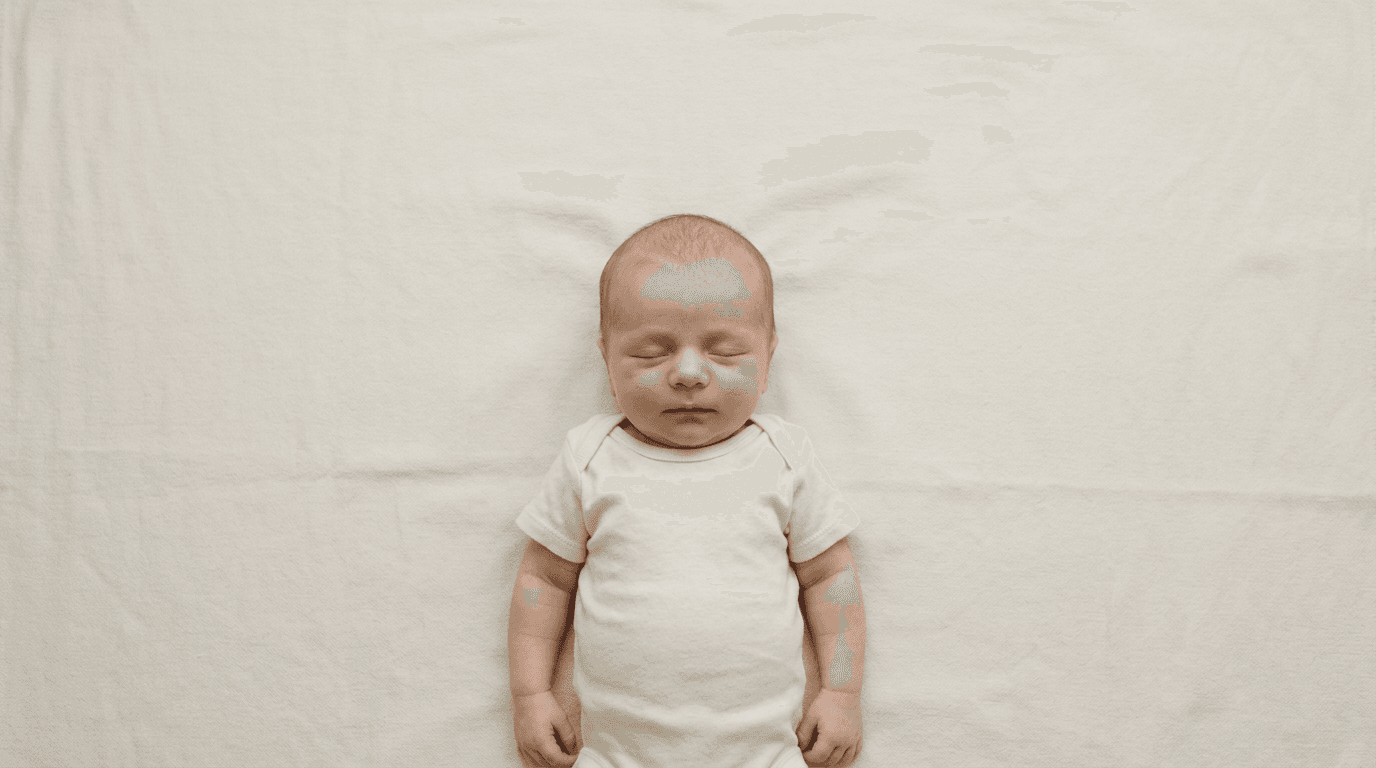
Laying a newborn on a flat sheet near a window is the easy part of capturing a passport image. The difficulty begins the moment you realize they cannot follow instructions to look at the lens, close their mouth, or keep their hands out of the frame. Understanding uk passport photo requirements requires translating strict adult biometric standards into a workflow that actually accommodates an infant's physical limitations. HM Passport Office (HMPO) processes millions of applications, relying heavily on automated facial recognition software to vet incoming images. When an image fails, it is rarely because the parent used a low-quality camera; it fails because the lighting created false shadows, the background color disrupted the software's ability to map the jawline, or the facial proportions fell outside the mandatory millimeter constraints. Approaching this process mechanically, rather than just taking a nice picture, is what separates an accepted application from a rejected one.
Quick Summary
Capturing an infant's passport photo for a UK application means prioritizing biometric compliance over aesthetics. HM Passport Office uses automated software that demands precise facial mapping and specific background contrast, which often contradicts basic newborn photography techniques.
- The head must measure exactly 29mm to 34mm from the crown to the chin.
- Backgrounds must be plain light gray or cream, never pure white.
- Infants under one year old do not need to have their eyes open.
- Children under six years old are exempt from the plain expression rule.
- No pacifiers, toys, or supporting hands may be visible in the frame.
Table of Contents
- Why adult biometric algorithms reject infant features
- How HM Passport Office measures facial proportions
- Where background contrast triggers automatic rejections
- What changes when the applicant is under one year old
- Why diffused lighting determines algorithmic acceptance
- When to rely on digital processing workflows
- FAQ
- Recommended Reads
Why adult biometric algorithms reject infant features
The digital vetting system used by HM Passport Office is designed to map adult nodal points. It scans the incoming image to measure the distance between the pupils, the width of the mouth, and the distance from the bottom of the chin to the base of the nose. Infants inherently lack defined jawlines and often have compressed facial features, which immediately puts their photos at a disadvantage when evaluated by algorithms calibrated for adult bone structures.
When a parent attempts to hold a baby up for a photo, the natural instinct is to support the neck or shoulders. However, even a single knuckle visible in the frame introduces an unmapped shape that the biometric software registers as a foreign object or a secondary face, triggering an automatic rejection. Furthermore, babies often tilt their chins down, creating a double chin that obscures the actual jawline. The software relies on finding the distinct bottom edge of the chin to establish the total vertical head height. If a shadow or a fold of skin masks this edge, the crop tool cannot align properly.
Overcoming this requires laying the infant flat rather than holding them up. By placing the baby on their back, gravity naturally extends the neck slightly and pulls the shoulders flat, exposing the jawline cleanly to the camera above. This physical arrangement gives the biometric software the unobstructed facial perimeter it needs to lock onto the necessary nodal points. For families navigating these strict constraints, consulting a comprehensive United Kingdom Baby Passport Photo Guide provides the exact positioning techniques required to satisfy the algorithmic scanners.
How HM Passport Office measures facial proportions
A biometric photo is a mathematical map masquerading as a portrait. The physical uk passport photo size dictates that the final printed image must be exactly 45 millimeters high by 35 millimeters wide. Inside that frame, the vertical height of the applicant's head - measured from the very top of the head (the crown, ignoring hair volume) down to the bottom of the chin - must fall strictly between 29 millimeters and 34 millimeters.
If the head is 28 millimeters tall, the face is too far away, and the software cannot accurately map the distance between the eyes. If the head is 35 millimeters tall, the face is too close to the lens, which risks cutting off the top of the head or pushing the chin too close to the bottom edge during the final passport manufacturing process. This specific cropping ratio is notoriously difficult to achieve in-camera when photographing a moving infant. Parents attempting the process manually often leave too much negative space around the baby, requiring them to digitally zoom in later. Zooming degrades the pixel density, pushing the image below the mandatory resolution threshold.
To manage this, the camera should be held roughly 1.5 meters (about 5 feet) away from the infant. This distance prevents the optical distortion that occurs when a smartphone lens is held too close to a face, which artificially inflates the size of the nose and alters the biometric map.
| Specification | UK Infant Requirements | US Infant Requirements |
|---|---|---|
| Overall Size | 45mm tall x 35mm wide | 2 inches x 2 inches (51x51mm) |
| Head Height | 29mm to 34mm | 1 inch to 1 3/8 inches (25-35mm) |
| Background Color | Light gray or cream | Pure white or off-white |
| Eye Rule (Under 1) | Can be closed | Must be open (mostly) |
| Expression | Plain (unless under 6) | Neutral, no exaggerated smiling |
Comparing these specifications to those found in a United States Baby Passport Photo Guide highlights why a photo accepted by one government will be instantly rejected by another.
Where background contrast triggers automatic rejections
One of the most frequent points of failure for British applications is the background color. While the global default for biometric images is pure white, british passport photo requirements explicitly mandate a plain light gray or plain cream background. Submitting a photo with a pure white background to HMPO often results in a swift rejection.

The mechanical reason behind this rule is contrast mapping. Infants are frequently dressed in light-colored clothing or wrapped in white blankets. If a pale-skinned baby wearing a white onesie is photographed against a pure white background, the image processor cannot determine where the baby's shoulder ends and the background begins. The software requires a distinct, continuous outline of the head and upper torso to digitally extract the portrait for printing onto the polycarbonate passport data page. Light gray or cream provides just enough tonal difference to isolate the subject without darkening the overall exposure of the image.
Practical rule: Never use a textured blanket, a wrinkled sheet, or a background with a visible weave; the biometric software interprets heavy fabric textures as background patterns, which are strictly forbidden.
Achieving this plain background at home usually involves purchasing a specific piece of light gray poster board rather than relying on household linens. Bed sheets, no matter how tightly pulled, inevitably create micro-shadows in their creases. If you must use fabric, it must be ironed completely flat and pulled taut over a solid surface. If the background fails the contrast test, the entire image fails, regardless of how perfectly the facial proportions were captured. Parents looking to guarantee compliance often rely on an automated US Baby Passport Photo Maker that uses artificial intelligence to strip away the physical background entirely and replace it with the exact color hex code required by the destination country.
What changes when the applicant is under one year old
HM Passport Office recognizes that compelling an infant to hold a specific pose is physically impossible, so they have instituted rigid but specific exemptions based on the age of the applicant. The most critical exemption applies to children under one year of age: they are not required to have their eyes open.
For adults, eyes must be open, fully visible, and free from red-eye or flash reflection. Attempting to wake a sleeping newborn and force them to look directly at a camera lens usually results in crying, which distorts the mouth and facial muscles. Because the under-one exemption exists, the most efficient method for securing a newborn passport photo is to photograph them while they are sound asleep.
For children under six years old, the requirement to maintain a strictly plain expression is also waived. A slight smile, a frown, or an open mouth will not cause a rejection for a toddler. However, this exemption does not allow for external objects. A pacifier or a teething toy completely obscures the mouth, preventing the software from measuring the width of the lips and the distance from the mouth to the chin. Even if a child under six is crying, their mouth must be empty.
Understanding these specific thresholds is vital for parents navigating US & International Baby Passport Photo Requirements & Guides. Attempting to force an infant to comply with an adult rule that does not actually apply to them usually results in a stressful photoshoot and a lower-quality final image. Knowing exactly what the processor will excuse allows you to focus solely on the metrics they will actually enforce, such as head alignment and shadow prevention.
Why diffused lighting determines algorithmic acceptance
Lighting is the invisible framework that dictates whether a digital image is legible to a machine. When parents attempt to take passport photos indoors, they often rely on ceiling lights or the camera's built-in flash. Both choices introduce immediate points of failure.
Direct overhead lighting creates hard shadows under the eyebrows, nose, and chin. To a facial recognition algorithm, a heavy shadow under the nose can look like a mustache, and a deep shadow under the chin essentially erases the bottom of the face, making it impossible to calculate the 29-34mm head height. A camera flash is equally destructive; it causes harsh specular highlights on the forehead and cheeks, wiping out skin detail, and frequently causes red-eye. While red-eye can easily be corrected in consumer software, any digital alteration of the facial features in a passport photo constitutes image manipulation, rendering the document fraudulent and invalid.
The only reliable solution for infant photography is diffused natural light. Positioning the baby near a large, north-facing window (or waiting for an overcast day) provides soft, directional light that wraps around the face without casting hard shadows. If the window light is coming from one side and leaving the other side of the baby's face slightly darker, a white piece of cardboard can be placed on the shadowed side to bounce light back into the face, evening out the exposure.
The background must also be evenly lit. If the baby's head casts a dark drop-shadow directly onto the gray poster board behind them, the software will read that shadow as an asymmetric head shape. Keeping the light source indirect and ensuring the baby is lying completely flat against the background minimizes the distance where a drop-shadow can form, ensuring a flat, evenly illuminated file.
When to rely on digital processing workflows
The traditional method of taking a film roll to a local pharmacy is rapidly being replaced by digital submission pipelines. When applying for a document online, you must upload an online uk passport photo file rather than mailing in physical prints. This digital file is subject to its own set of strict data requirements before the facial recognition software even looks at the portrait.
The file must be in JPEG format and cannot be smaller than 50KB or larger than 10MB. More importantly, the digital image must measure at least 600 pixels wide by 750 pixels high. If a parent takes a photo from too far away and then aggressively crops it on their phone to isolate the head, the resulting file often drops below this 600x750 pixel threshold. When an undersized image is uploaded, the government portal will automatically stretch it to fit the submission box, resulting in a pixelated image that fails the biometric scan instantly.
Practical rule: Never use a screenshot of a photograph for a passport application; the screen resolution of a mobile device compresses the file below the minimum biometric data requirements.
Navigating these file size, resolution, and format constraints is why many applicants rely on dedicated processing platforms. A platform that processes united kingdom passport photos will automatically verify the pixel count, adjust the background color, and set the precise head crop ratio before generating the final JPEG. For applicants unsure if their raw image meets the necessary digital thresholds, consulting a platform's Help Center can clarify how resolution scaling works. Furthermore, because government portals offer very little feedback beyond a generic rejection notice, using a service backed by a 100% Refund Policy transfers the financial risk of a failed upload away from the parent and onto the platform's compliance engine.
FAQ
Do both of my baby's ears need to be visible in a UK passport photo? The HMPO guidelines state that the applicant should face forward and look straight at the camera. While it is ideal for both ears to be visible, if a baby's ears naturally sit flat against their head or are obscured by hair, the photo will not be rejected solely for hidden ears, provided the head is perfectly straight and not turned to the side.
Can my newborn wear a headband or a bow for the picture? No. Hair accessories, large bows, and decorative headbands are prohibited. The hair must not obscure the face, and accessories can confuse the scanning software. Only head coverings worn for documented religious or medical reasons are permitted.
What should I do if my baby keeps putting their hands near their face? Swaddling the baby firmly from the shoulders down with a blanket that matches their clothing (not the background) can help keep their arms secured at their sides. Ensure the swaddle does not cover the chin or the neck.
Can I digitally remove a shadow from the background? No. Digitally painting over a shadow, blurring the background, or manually altering the pixels around the head is considered photo manipulation and will result in rejection. If you cannot achieve a shadow-free background in-camera, you must use a specialized automated tool designed to cleanly extract the subject and replace the background entirely without altering the biometric data.
How recent must the photo of my baby be? The photograph must have been taken within the last month (30 days) before the application is submitted. Because infants change appearance rapidly, using a photo that is several months old will lead to processing delays or rejection.