Passport Card Photo Requirements: How They Differ From Standard Booklets
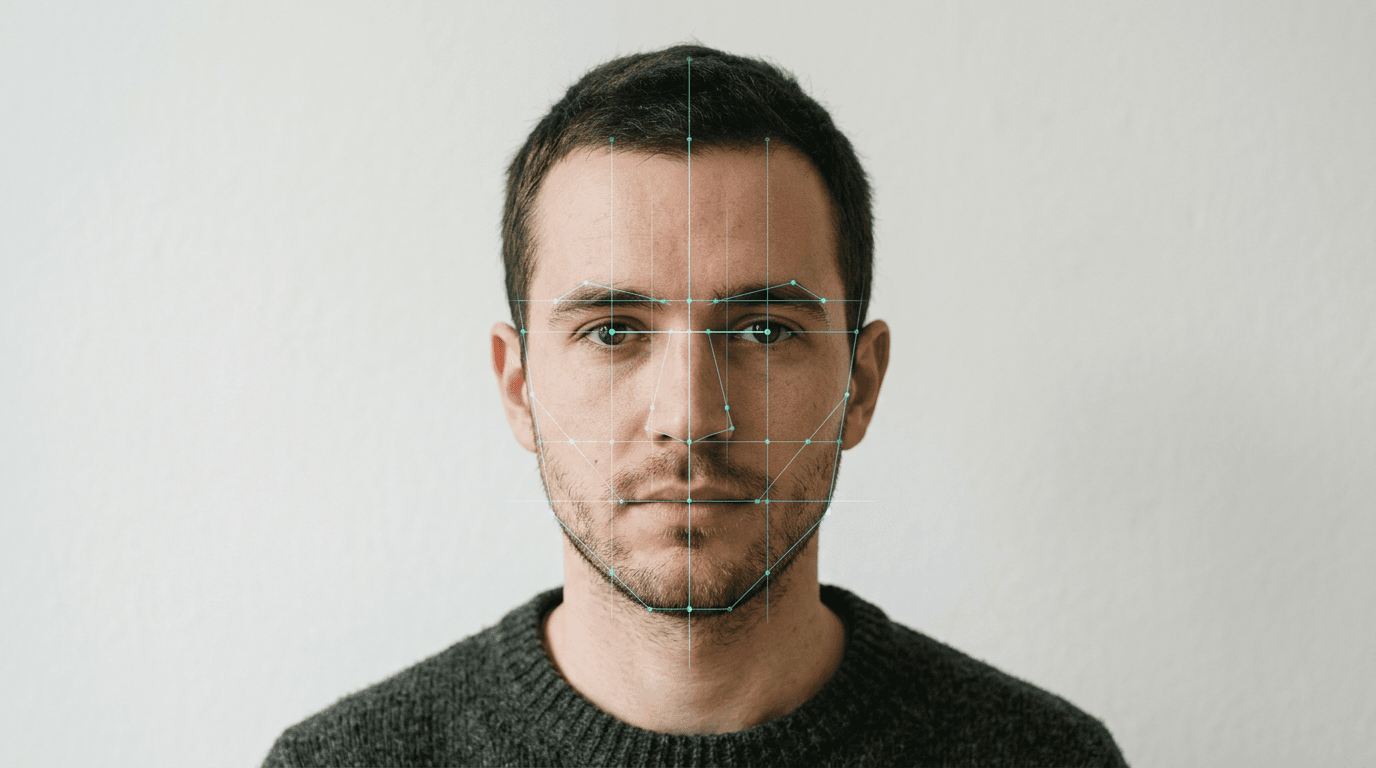
Most applicants discover the strictness of a passport card photo only after they open a letter from the State Department containing a Form DS-89, demanding new imagery. You submitted the exact same digital file that worked for your local driver's license, assuming the smaller card format allows for lower resolution or tighter cropping. Instead, the automated compliance system rejects the file because the physical dimensions of the card require flawless facial mapping to function at automated border crossings. A travel card image is not merely a downsized booklet print; it is a specialized data point designed for specific radio-frequency identification environments at land and sea ports. When a digital file lacks the proper geometric anchors, lighting uniformity, or edge definition, the engraving machinery cannot physically produce a valid credential.
Quick Summary
A passport card photo operates under the same foundational State Department guidelines as standard booklets, but the physical constraints of the card format make cropping and contrast errors far more likely to trigger automated rejections.
- Card printing compresses the image, turning slight shadows into unrecognizable dark patches.
- The polycarbonate surface requires a flawless color source file to produce a clean laser-engraved final image.
- Standard 2x2 inch prints must leave adequate negative space to accommodate the card's specific aspect ratio.
- Native smartphone background removal often destroys the facial geometry required by verification software.
Table of Contents
- What sets the biometric baseline for US travel cards
- Why lighting standards dictate color validity
- Where the physical format distorts standard head proportions
- How infant and toddler variables trigger automatic rejection
- What breaks first when automating background removal
- Specification differences between travel documents
- FAQ
- Recommended Reads
What sets the biometric baseline for US travel cards
The transition to digital scanning at border crossings fundamentally changed how photographs are evaluated. A modern USA biometric passport system relies on facial recognition software that maps specific geometric landmarks across the face. Instead of a human agent briefly comparing a printed image to the person standing in front of them, automated algorithms measure the interpupillary distance - the exact space between the centers of the eyes - and the vertical axis running from the bottom of the chin to the top of the head. When you submit a photograph, the system maps this geometry to create a baseline template.
If the subject's head is tilted even two degrees (yaw) or leaning forward (pitch), this geometric calculation fails immediately. The software requires a perfectly frontal pose so both sides of the face mirror each other. A common mistake applicants make is using a wide-angle smartphone lens held too close to the face. Standard smartphone cameras usually feature a 24mm to 28mm equivalent focal length. When held at arm's length, this wide focal length aggressively distorts the center of the face, artificially enlarging the nose and widening the apparent space between the eyes. To the algorithm, this optical distortion registers as a completely different facial structure, resulting in a biometric mismatch.
To prevent this, the camera must be placed at least four feet away from the subject, utilizing a slight zoom (a 50mm to 85mm equivalent focal length) to compress the features realistically. The physical passport card, utilizing RFID technology for the REAL ID framework, demands tight image cropping. Because the card is physically smaller than a booklet page, any distortion in the source image becomes amplified during the final print.
Comparing these parameters to international standards reveals how universal this geometry requirement has become. For example, Germany infant photograph rules utilize nearly identical facial mapping algorithms, proving that whether the credential is European or American, the underlying biometric geometry dictates whether the file is accepted or rejected.
Why lighting standards dictate color validity
Applicants are strictly required to submit a color passport photo. However, the physical passport card actually features the applicant's image laser-engraved onto a polycarbonate layer in grayscale. This prevents counterfeiting and ensures the credential survives extreme wear and tear. This mechanical conversion process is exactly why the initial color file must feature flawless lighting and contrast.

If the original image features harsh side-lighting, a color photograph might still look identifiable to a human eye. The brain naturally compensates for a dark shadow cast across the right cheek. However, when that same image is converted to grayscale and burned into plastic by a laser, a slight shadow simply becomes a solid black void, erasing half of the subject's facial data.
This is why the State Department mandates perfectly even, diffuse lighting. Standard on-camera flashes often create specular highlights - bright white blowouts on the forehead or the bridge of the nose. In the sRGB color space, these highlights register as pure white pixels containing absolutely no skin texture data. When laser-engraved, these blown-out areas appear as holes in the face. Understanding international biometric photo standards requires recognizing that lighting is not about aesthetics; it is about providing a data-rich topographical map of the face.
Furthermore, images taken in low-light environments force the camera to increase its ISO sensitivity, introducing heavy digital grain or noise. While noise reduction software can smooth this out, it often blurs the sharp edges of the eyes and lips. When a grainy, artificially smoothed image is subjected to grayscale conversion, the noise translates into physical artifacting on the polycarbonate, degrading the image quality well past the acceptable threshold for border control scanners.
Practical rule: Always position your primary light source indirectly - such as facing a large window on an overcast day - to ensure the lighting wraps evenly around the face without creating dense shadows under the nose or chin.
Where the physical format distorts standard head proportions
The State Department mandates that all submitted photo files measure exactly 2x2 inches (51x51 mm) with a digital resolution of at least 600x600 pixels at 300 DPI. Within that square, the applicant's head must measure between 1 and 1 3/8 inches (25-35 mm) from the bottom of the chin to the top of the hair.
While this specification works perfectly for a standard passport booklet, the passport card presents a unique physical challenge. The card itself is ID-1 format, measuring roughly 85.60 mm by 53.98 mm, similar to a standard credit card. The photograph printed onto this card is rectangular, not square. When the automated processing system ingests the 2x2 inch square file, it applies a specific rectangular crop to fit the card's limited layout real estate.
If an applicant sizes their head at the absolute maximum of 1 3/8 inches within the original 2x2 square, the automated cropping tool will almost certainly slice off the top of the subject's hair or the bottom of their chin when converting the square to a rectangle. Because the biometric passport photo requires the entire head to be visible, this automatic crop instantly invalidates the application.
Applicants attempting to format these images themselves often stretch or warp the aspect ratio to force the head into the frame. Any manual warping immediately destroys the geometric baseline the algorithm relies on. The image must remain a perfect 1:1 square ratio upon submission, meaning the only way to protect against the card crop is to manipulate the negative space during the initial capture.
Practical rule: Always position the head so it measures closer to the minimum 1-inch requirement within the 2x2 square, leaving a generous 10mm buffer of white space above the crown of the head to accommodate the card's automated rectangular crop.
How infant and toddler variables trigger automatic rejection
Getting an adult to sit perfectly straight with a neutral expression is relatively simple; getting an infant to do so introduces a massive array of mechanical failure modes. Newborns and young toddlers lack the cervical muscle control to hold their heads perfectly level. When they are propped up, their heads tilt, introducing yaw and roll. When they recline, their chins tuck deeply into their chests. To the verification software, this chin-tuck shadow artificially alters the vertical measurement of the face, triggering an automatic rejection.
When navigating United States baby passport photo guidelines, the most reliable approach is the flat-lay method. The infant is placed flat on their back over a plain white sheet, eliminating the need for neck control. However, this introduces a new lighting hazard. Parents often lean directly over the infant to capture the image from above, casting a hard, dense shadow over the child's face and the background. The software flags this as uneven illumination.
Wrinkles in the white sheet behind the infant's head create textural shadows that the algorithm often confuses for background objects. Furthermore, a baby's natural reflexes mean hands frequently enter the frame. If a finger obscures even a fraction of the jawline or cheek, the image is voided. Pacifiers and closed eyes are instant failures because they hide the precise anatomical anchors - the pupillary distance and the lip line - that the software requires to map the face.
To prevent the chin-tuck shadow during a flat-lay, place a small, rolled hand towel directly under the white sheet beneath the baby's upper spine. This gently elevates the chest and allows the head to drop back slightly, exposing the neck and ensuring a clean vertical measurement from the chin to the crown.
What breaks first when automating background removal
To avoid the hassle of setting up a pure white backdrop and ironing out wrinkles, many applicants shoot against a standard painted wall and attempt to use native smartphone tools to replace the background. This practice routinely destroys the file's compliance integrity.
Consumer-grade background removal relies on edge-detection algorithms designed for social media, not biometric security. These tools struggle to differentiate between a white wall and light-colored hair, and they frequently clip the outer curve of the ear or blend the jawline into the background. When the State Department's software scans the submitted image, it detects these unnatural, sharp pixel boundaries and flags the file as digitally manipulated. Erasing physical data is categorized as photo tampering.
Furthermore, sending these heavily edited files between devices often triggers automatic JPEG compression. Texting the photo from a phone to a desktop computer strips vital metadata, degrades the 300 DPI resolution, and introduces compression artifacts around the eyes and mouth. By the time the file is uploaded, it no longer meets the baseline data requirements.
For those resolving common photo rejection issues, the solution usually requires abandoning standard smartphone cutouts. If you cannot shoot against a perfectly flat white background in natural light, you must rely on specialized baby passport photo software designed specifically for biometric compliance. These tools do not simply mask the background; they utilize complex thresholding to preserve the original edge geometry of the hair and ears while normalizing the background to the required #FFFFFF hex code. Additionally, using professional platforms ensures adherence to secure photo data handling policies, guaranteeing that sensitive biometric data is not stored or sold by unregulated third-party editing apps.
Specification differences between travel documents
While the source file requirements overlap, the physical medium of the final document changes how strict the tolerances are applied. A photo that barely passes the booklet test will frequently fail the card test due to the physical manufacturing process.
| Specification | Standard Passport Booklet | Passport Card |
|---|---|---|
| Source Image Size | 2x2 inches (51x51 mm) | 2x2 inches (51x51 mm) |
| Final Printed Format | Ink printed on secure paper | Laser-engraved on polycarbonate |
| Final Output Color | Full Color | Grayscale |
| Primary Usage | International air travel | Land and sea border crossings |
| Cropping Sensitivity | Low (square aspect ratio maintained) | High (rectangular aspect ratio applied) |
| Resolution Requirement | 300 DPI | 300 DPI (Strict enforcement for engraving) |
FAQ
Can I submit the same photo for both the passport book and card?
Yes. The State Department uses the exact same 2x2 inch digital or physical source file for both documents. However, because the card physically crops the file into a rectangle and laser-engraves the image in grayscale, a photo with marginal lighting that might pass for a booklet is frequently rejected when applied to the card.
Why did the processing facility reject my color passport photo for washing out my features?
Heavy digital processing, overexposure, or firing a hard flash directly at the face removes the mid-tone data from your skin. Because the physical card prints entirely in grayscale, those missing mid-tones result in a completely blank, unrecognizable face on the final laser-engraved credential.
Do I need to remove my glasses for a USA biometric passport application?
Yes. The State Department strictly prohibits eyeglasses in all travel document photos, regardless of medical necessity. Glasses cause lens glare, obscure the critical pupillary distance measurement, and cast hard shadows on the orbital bones, which entirely breaks the facial recognition mapping software.
Does an infant need a separate photo if they are traveling on a parent's application?
Every individual, regardless of age, must possess their own unique travel document and an accompanying compliant photograph. You cannot carry a child on a parent's passport card, and the infant's photo must meet the exact same biometric geometry standards as an adult's.