How to Order Passport Photos Online: 4 Verified Services Compared
The rejection letter from the passport agency usually arrives three weeks after you submit the application, citing a shadow behind the left ear or a head size measuring one-sixteenth of an inch too large. Choosing to order passport photos online shifts the burden of capturing a compliant image from a rushed post office clerk to your own living room. You control the lighting, you take as many attempts as necessary to get a squirming infant to face the lens, and you avoid the high markup of a dedicated studio. However, bypassing the traditional photo counter also means inheriting the compliance risk yourself. A digital file that looks perfect on a smartphone screen can still fail the moment it is transferred to physical paper if the aspect ratio shifts or the trimming is inexact.
Quick Summary
When you order passport photos online, you upload a digital portrait to a processing platform that adjusts the framing, removes background clutter, and formats the file to strict government biometric standards. These platforms then route the finished image for physical printing, bypassing expensive professional studios entirely.
- Online platforms run automated checks against common rejection triggers like head tilt and low contrast.
- Fulfillment methods dictate your timeline, ranging from same-day pharmacy collection to multi-day postal transit.
- Mishandling raw prints at home remains a primary cause of physical application failure.
- Premium platforms offer manual human review to guarantee compliance before printing.
Table of Contents
- Buying Guide / How to Choose
- 1. EZ Prints
- 2. PhotoBooth Online
- 3. Passport Photo Ready
- 4. Passport Photo Online
- Matching the Fulfillment Method to Your Timeline
- Recommended Reads
| Product | Fulfillment Method | Features | Pros | Cons | Target Audience |
|---|---|---|---|---|---|
| EZ Prints | Self-Cut Bulk Printing | Glossy paper, 5x7 sheet format | Very low base cost, Free shipping minimums, Consolidates family orders | No automated compliance check, Requires manual cutting, No digital download | Budget-conscious families with pre-verified files |
| PhotoBooth Online | Ship-to-Home Delivery | Digital templates, U.S. compliance checks | Integrated refund policy, Digital and print bundles, Automated sizing | Multi-day transit delay, Mail unreliability, Basic validation only | Standard-timeline applicants needing automated formatting |
| Passport Photo Ready | Local Retail Pickup | Selfie verification, Pharmacy routing | Same-day physical access, High acceptance rate, Money-back guarantee | Bound by local store hours, Dependent on store print quality, Higher digital base price | Urgent applicants requiring immediate physical prints |
| Passport Photo Online | Ship-to-Home Delivery | Mobile application, Expert human review | Professional oversight, Cross-platform app, Pre-shipment validation | High premium price, Postal delay remains, Expensive for groups | Applicants prioritizing guaranteed acceptance over cost |
Buying Guide / How to Choose
Evaluating the passport photo online cost requires looking past the initial digital processing fee. The core challenge is not merely generating a file with a white background; it is moving that file onto photo-quality paper at the exact required dimensions without introducing blur, artifacts, or margin errors. State Department rules mandate a 2-by-2-inch physical square, printed on glossy or matte photo-quality paper, with the subject's head measuring exactly between 1 and 1 3/8 inches from the bottom of the chin to the top of the hair.
The axis that genuinely separates the services available today is the Fulfillment Method. This determines who handles the physical transfer from pixels to paper, and it divides the market into three distinct categories:
- Ship-to-Home Delivery: The service prints the verified photos on professional dye-sublimation machines at a central facility and mails them to your address. You receive correctly sized, pre-cut squares. This guarantees physical compliance but introduces a transit delay that cannot be rushed.
- Local Retail Pickup: The platform formats a 4x6 template containing two or more standard biometric squares and transmits it to a local pharmacy or retail photo center. You walk in, pay for a standard 4x6 print, and collect it the same day. The risk here is the retail machine applying an automatic "fit to page" crop, which shrinks the final head size and triggers an automatic government rejection.
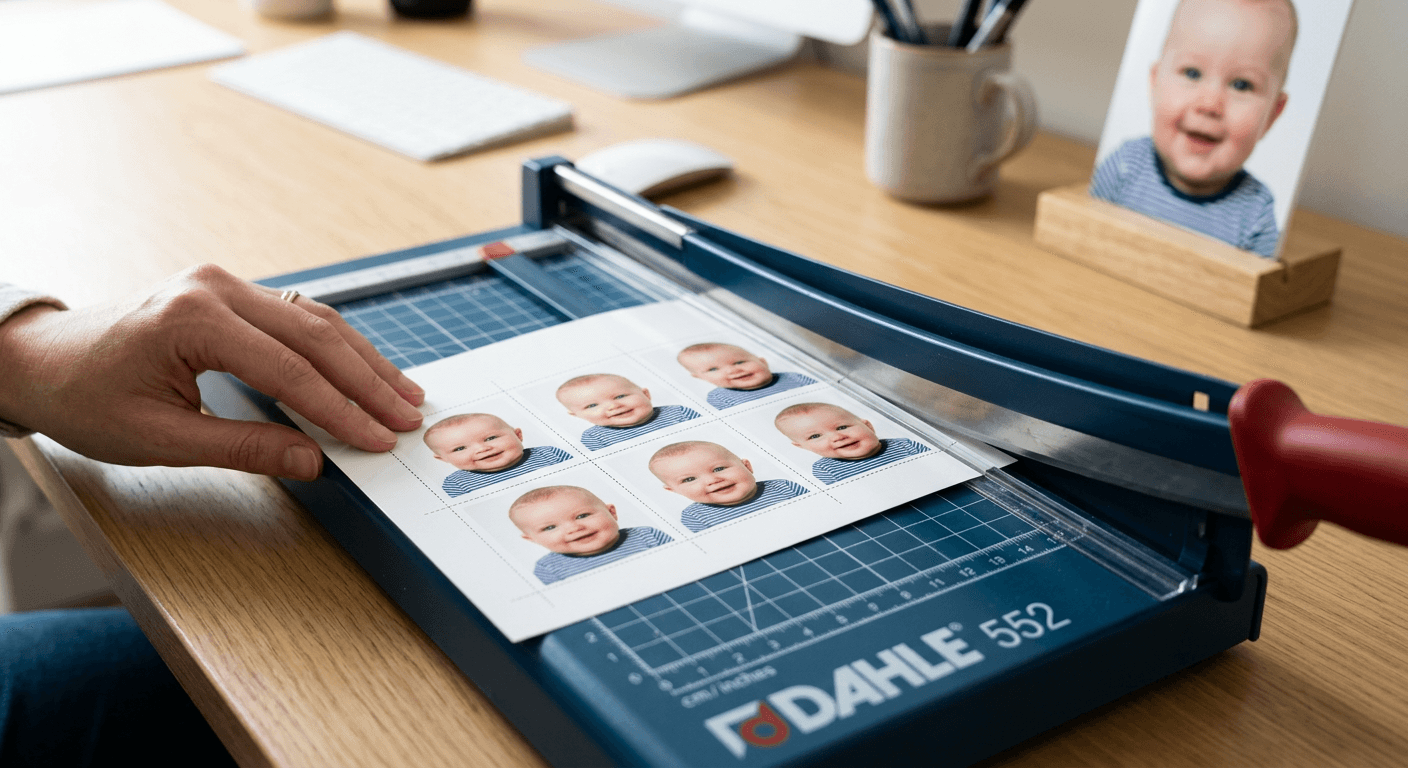
- Self-Cut Bulk Printing: The provider mails a large sheet containing multiple duplicate photos, shifting the responsibility of separating them to you. This is historically the cheapest place for passport photos, but it introduces the severe mechanical risk of uneven scissor cuts or frayed edges.
Practical rule: Always measure the physical print with a ruler before submitting it; a digital file perfectly verified at 2x2 inches will still print at 1.9 inches if a local pharmacy machine applies a default border margin.
Understanding these categories clarifies exactly where your money goes. A detailed United States Baby Passport Photo Guide outlines the exact spacing tolerances for infants, proving that while digital preparation is vital, the final physical substrate is what the government clerk actually scrutinizes.
1. EZ Prints
Standing in sharp contrast to full-service validation platforms, EZ Prints assumes your digital file already perfectly meets every legal requirement before it ever hits their servers. This vendor acts as an online custom photo printing service that produces and ships glossy passport photos directly to your home without interfering with the image data. You upload the file, and the facility prints four identical 2" x 2" photos on a single 5" x 7" sheet. According to its published pricing, passport photo prints on the platform cost as low as $3.00, making it an exceptionally lean choice. The company also offers free shipping on orders of $79 or more, which benefits large groups ordering extensive photo packages simultaneously.
Raw printing requires manual finishing
The platform operates purely as a mechanical output device. It does not run biometric algorithms, it does not check for heavy shadows across the bridge of the nose, and it will not warn you if your subject is standing off-center. It maps your exact pixels onto standard glossy stock and triggers the shipping protocol.
Self-Cut Bulk Printing leaves the final step to you. Customers must cut the glossy printed sheet into individual 2" x 2" photos themselves to meet government guidelines. Passport agencies demand clean, straight edges. Using standard household scissors often results in slightly curved lines, jagged borders, or white slivers left along one side. Any of these mechanical errors will prompt a clerk to reject the entire application. I would hesitate to recommend this workflow if you do not own a heavy-duty paper trimmer or a guillotine cutter. The blade must make a perfectly perpendicular slice.
Reserve this route for bulk applications where you possess pre-verified digital files and the mechanical tools to cut them cleanly.
Pros
- Extremely low base price per printed sheet
- Generates four identical photos simultaneously
- Cost-effective for large family applications
Cons
- Requires dangerous manual cutting at home
- Lacks automated biometric compliance checks
- Shipping fees apply to small individual orders
2. PhotoBooth Online
The primary bottleneck in do-it-yourself photography is not taking the picture, but knowing definitively whether the lighting and framing will survive government scrutiny. By combining a digital template generator with mail delivery, PhotoBooth Online checks uploaded photos for U.S. government compliance and translates them into printable formats. The system operates on a dual-track pricing model. The Prints + Digital plan costs $9.95, providing a digital set alongside six printed 2" x 2" photos shipped via USPS. Alternatively, the Digital set costs $2.95, yielding a high-resolution photo and a printable 4x6 template containing six 2" x 2" images for independent printing.
Automated templates bypass manual formatting errors
The mechanism focuses on automated geometric alignment. When a user uploads a portrait, the software evaluates the distance between the chin and the crown, adjusts the background to a compliant flat tone, and scales the image so it fits perfectly within the required dimensions. If the resulting image fails at the passport office, the service offers a 100% refund. Reviewing a strict 100% Refund Policy reveals how critical these guarantees are; they force the software provider to maintain highly accurate validation thresholds rather than letting bad images slip through.
The limitation sits within the Ship-to-Home Delivery category itself. The shipped prints option carries an estimated delivery timeframe of 2 to 3 business days. This hard delay removes the platform from consideration for anyone dealing with an emergency flight or a last-minute realization that a visa expires at the end of the week. I would opt for this service when processing routine renewals, as the low cost of the digital template provides an excellent safety net.
Choose this generator when standard processing timelines allow for a few days of postal transit without jeopardizing your application.
Pros
- Low-cost digital template generation
- Integrated compliance checking software
- Refund guarantee on rejected files
Cons
- Postal transit delays physical availability
- USPS routing adds transit unpredictability
- Six prints often exceed single application needs
3. Passport Photo Ready
A sudden realization that a passport expires just days before an international flight is the exact trigger event that sends families searching for an immediate physical solution. Families facing imminent travel rely on Passport Photo Ready, an online passport photo processor that verifies selfies against U.S. State Department requirements to generate digital files and in-store pickup options. The baseline service starts at $8.99, yielding a digital download and a pre-formatted 4" x 6" sheet.
Pharmacy integration secures same-day physical copies
The platform's architecture is built around routing pre-cleared images directly into retail photo networks. Once the system's software validates the selfie's lighting, head tilt, and background uniformity, it locks the aspect ratio into a standard 4x6 template. It then provides the option to pick up professional prints at a local Walgreens. Because the template is locked, the local pharmacy machine prints it exactly as formatted, bypassing the risk of the retail clerk manually stretching the image. The company backs its validation engine with a money-back guarantee, offering up to double your money back if the photo is rejected by the government. On its site, it claims a rating of 4.87/5 based on 2,329 accepted photos.
The friction point of Local Retail Pickup is the reliance on third-party infrastructure. You still have to leave the house to retrieve the physical prints, making you entirely dependent on the operating hours of a local pharmacy and the operational status of their specific photo kiosks. What would make me hesitate is a scenario where the local store's dye-sublimation printer is out of paper or suffering a calibration error on the exact day you need the photos.
Select this routing tool when you need professionally printed sheets in your hands today and live near a supported pharmacy.
Pros
- Same-day physical print availability
- Double money-back rejection guarantee
- Bypasses unpredictable postal delays
Cons
- Requires travel to a retail location
- Dependent on local store machine maintenance
- Higher base price than raw digital templates
4. Passport Photo Online
According to its published pricing, opting for a digital-only file with expert validation on Passport Photo Online costs $16.95. Replacing the traditional photo studio entirely, this biometric photo generator and mobile app prepares compliant passport photos from home and dispatches physical prints. Users access the platform via a web browser or through a dedicated mobile application available for download on both iOS and Android platforms.
Human expert checks intercept biometric failures
The mechanism here upgrades standard automated validation by inserting a human review layer before finalization. Once the algorithm clears the background and adjusts the framing, a trained expert reviews the file to catch subtle violations that machines miss - such as a slight glare on eyeglasses, a hairline shadow, or an unnatural expression. If the image passes, the facility prints it and ships it, with delivery taking up to 3 business days anywhere in the United States. For strict international standards, consulting specific US & International Baby Passport Photo Requirements & Guides prevents rejection across borders, and human oversight ensures those obscure foreign regulations are met.
The cost of this human oversight defines its limitation. The service charges $19.95 for printed photos with home delivery included. Paying nearly twenty dollars for a single set of shipped prints creates a significant cost barrier, particularly when outfitting an entire family. I would bypass this option if budget constraints are strict, as the premium squarely targets peace of mind rather than pure cost efficiency.
Commit to this premium tier when you are willing to pay extra for human oversight and home delivery convenience.
Pros
- Human expert biometric validation
- Cross-platform mobile application access
- Catches subtle lighting and glare errors
Cons
- Premium pricing tier
- Maintains a three-day shipping delay
- Cost scales poorly for large families
Matching the Fulfillment Method to Your Timeline
The decision of where to order passport photos online ultimately rests on how quickly you need the physical paper and how much manual work you are willing to tolerate to keep costs low.
If you have weeks before your application appointment, Ship-to-Home Delivery offers the safest baseline. You trade transit time for the assurance that professional machines handle the printing and cutting. This route eliminates the risk of jagged scissor lines or retail store hardware failures, allowing you to simply wait for a verified envelope to arrive in your mailbox.
When standard processing is too slow but you still want algorithmic validation, Local Retail Pickup bridges the gap. By formatting the biometric dimensions onto a standard 4x6 template and routing it to a neighborhood pharmacy, you bypass the postal system entirely. This requires leaving your house, but it guarantees you hold the physical photos the very same afternoon you upload the selfie.
Practical rule: Do not use heavy-duty craft scissors or tearing tools to separate bulk prints at home, as passport agencies strictly reject any photo presenting frayed edges or bent corners.
Finally, for users processing multiple applications simultaneously or managing tight household budgets, Self-Cut Bulk Printing offers the lowest possible overhead. You surrender automated compliance checks and accept the mechanical risk of slicing the photos yourself, but you gain the ability to print entire sheets of photos for a fraction of the cost of a single studio visit.